

Overview
Scraping metrics with Prometheus
Every Thoras component that emits Prometheus metrics has aprometheus.enabled
toggle (default true) and a fixed prometheus.port. Scrape those ports
however your Prometheus already discovers targets.
If you use the Prometheus Operator, the chart can emit a ServiceMonitor for
every Thoras component:
Action Metrics
See Thoras in action. These metrics provide insight into how Thoras actively manages your application resources across your environment. They track when Thoras takes autonomous action to scale horizontally or vertically, when replicas or resource allocations differ from Thoras’ desired values, and how eachAIScaleTarget is currently operating. Together, these metrics give teams
the visibility they need to understand scaling behavior, make informed
decisions, and maintain efficient, well-performing applications.
System Health Metrics
Observe the state of Thoras’ system health. These metrics offer a window into the health and performance of the Thoras platform. They can also be easily integrated into popular observability tools like Datadog, Grafana, giving your team the flexibility to monitor Thoras wherever you already track system performance.Advanced Usage
Provisioning Ratio
Metric:thoras_provisioning_ratio
The provisioning ratio compares your current resource usage to the Thoras
recommended request. The Thoras recommended request is based on the predicted
maximum usage during the forecasted period.
Interpretation:
Note: Recommendations are based on the predicted maximum usage over the forecast
window. Utilization ratio lowers when preemptive up-scaling occurs.
ratio > 1.0: Current usage exceeding predicted maximumratio < 1.0: Current usage below predicted maximum
- Vertical scaling:
current_avg_request / recommended_request - Horizontal scaling:
current_total_usage / forecasted_value
Provisioning Delta
Metric:thoras_provisioning_delta
The provisioning delta shows the absolute difference between your current
resource usage and Thoras recommended request. The Thoras recommended request is
based on the predicted maximum usage during the forecasted period.
Units:
- Memory: bytes
- CPU: cores
abs(current_value - recommended_value)
Horizontal Scale Total
Metric:thoras_horizontal_scale_total
Tracks the total number of horizontal scaling actions Thoras has performed in
autonomous mode. Each increment represents a scaling event where Thoras adjusted
replica counts.
Example Queries & Dashboards:
Vertical Scale Total
Metric:thoras_vertical_scale_total
Tracks the total number of vertical scaling actions Thoras has performed in
autonomous mode. Each increment represents a scaling event where Thoras adjusted
resource requests or limits.
Example Queries & Dashboards:
Recommendation
Metric:thoras_recommendation
Shows Thoras’ current scaling recommendation for each AIScaleTarget. The value
and unit depend on the resource type being recommended.
Units:
- Memory: bytes
- CPU: cores
Scale Targets
Metric:thoras_scale_targets
Reports the count of AIScaleTargets currently managed by Thoras, broken down
by operational mode (autonomous or recommendation) and scaling dimension
(vertical or horizontal).
Example Queries & Dashboards:
Workload OOM Killed
Metric:thoras_workload_oom_killed_total
Counts the total number of OOM (Out of Memory) kill events observed per
workload. Each increment represents a container that was terminated due to
exceeding its memory limit. Use this metric to identify workloads that are
frequently running out of memory and may need higher memory recommendations.
Example Queries & Dashboards:
AST Active Suggestion
Metric:thoras_ast_active_suggestion
Indicates whether each auto-mode AIScaleTarget has an active suggestion at the
time of the last periodic check. The value is 1 when a suggestion exists and
0 when no suggestion is present. ASTs still within their startup grace period
are excluded.
Example Queries & Dashboards:
AST Metric Integrity
Metric:thoras_ast_metric_integrity
Note: Requires thorasWorker.enableMetricIntegrityWorker: true in values.yaml
(default true).
Reports whether Thoras has successfully collected CPU/memory metrics for each
AIScaleTarget in the most recent check interval. The value is 1 when the AST
is healthy and 0 when metrics are stale (the workload was running but no
CPU/memory samples were collected). Workloads that sat at zero replicas for the
entire window count as healthy, since no metrics are expected. ASTs still within
their creation grace period, as well as orphaned ASTs whose scale target no
longer exists, are absent from the metric entirely.
Use this metric to detect a wedged collector or broken metrics pipeline for a
specific workload.
Example Queries & Dashboards:
AST Disruption Completions
Metric:thoras_ast_disruption_completions_total
Counts completed disruption cycles per AIScaleTarget. When Thoras applies a
new vertical recommendation, it resizes or replaces the workload’s pods in
batches; once every pod is back in sync with the recommendation, the cycle
completes and this counter increments.
Use this metric to correlate Thoras resize activity against your own application
signals — error rates, latency, or restart counts — without having to infer
timing from resource requests changing on the workload.
Two things to know about what it counts:
- It counts cycles, not pods. A cycle that resized four pods increments by one, the same as a cycle that resized one. Cycles resolved entirely by in-place resize — with no pod restarts at all — are counted too, as are cycles that end early because the update policy changed mid-flight.
- It marks completion, not the start. Thoras records the cycle as complete on the check that observes every pod back in sync, so the timestamp trails the actual pod changes, typically by up to one disruption interval. When lining this up against an error-rate spike, expect the spike to precede the increment.
AIScaleTarget only after its first completed cycle, so
absence means no cycle has completed yet rather than zero.
Example Queries & Dashboards:
API HTTP Response Total
Metric:thoras_api_http_response_total
Tracks the total number of HTTP responses from Thoras’ internal API. This
counter increments for every API response and can help identify unusual traffic
patterns or issues.
Example Queries & Dashboards:
API HTTP Request Duration
Metric:thoras_api_http_request_duration_seconds
Measures the average response time for Thoras’ internal API requests in seconds.
Rising values may indicate performance degradation or capacity issues.
Example Queries & Dashboards:
Forecast Queue Pending Count
Metric:thoras_forecast_queue_pending_count
Labels: action (forecast or train)
Shows the current number of pending jobs waiting in the queue, broken down by
action type. High values indicate that requests are backing up, which may signal
worker capacity issues or processing bottlenecks.
Example Queries & Dashboards:
Forecast Queue Pending Oldest
Metric:thoras_forecast_queue_pending_oldest_duration_seconds
Tracks how long the oldest forecast job has been waiting in the queue. Rising
values indicate jobs are not being processed quickly enough.
Example Queries & Dashboards:
Forecast Queue Status Count
Metric:thoras_forecast_queue_status_count
Tracks the total number of forecast jobs processed, categorized by status. This
counter helps monitor forecast job lifecycle and identify issues with job
processing.
Example Queries & Dashboards:
Job Completions Total
Metric:thoras_job_completions_total
Tracks the total number of completed jobs, categorized by status (success,
failure, etc.) and job kind. This counter helps identify job failure rates and
patterns across different job types.
Example Queries & Dashboards:
Job Duration Seconds
Metric:thoras_job_duration_seconds
Measures the duration of completed jobs in seconds, broken down by status and
job kind. Use this to identify slow jobs or performance regressions.
Example Queries & Dashboards:
Grafana Dashboard
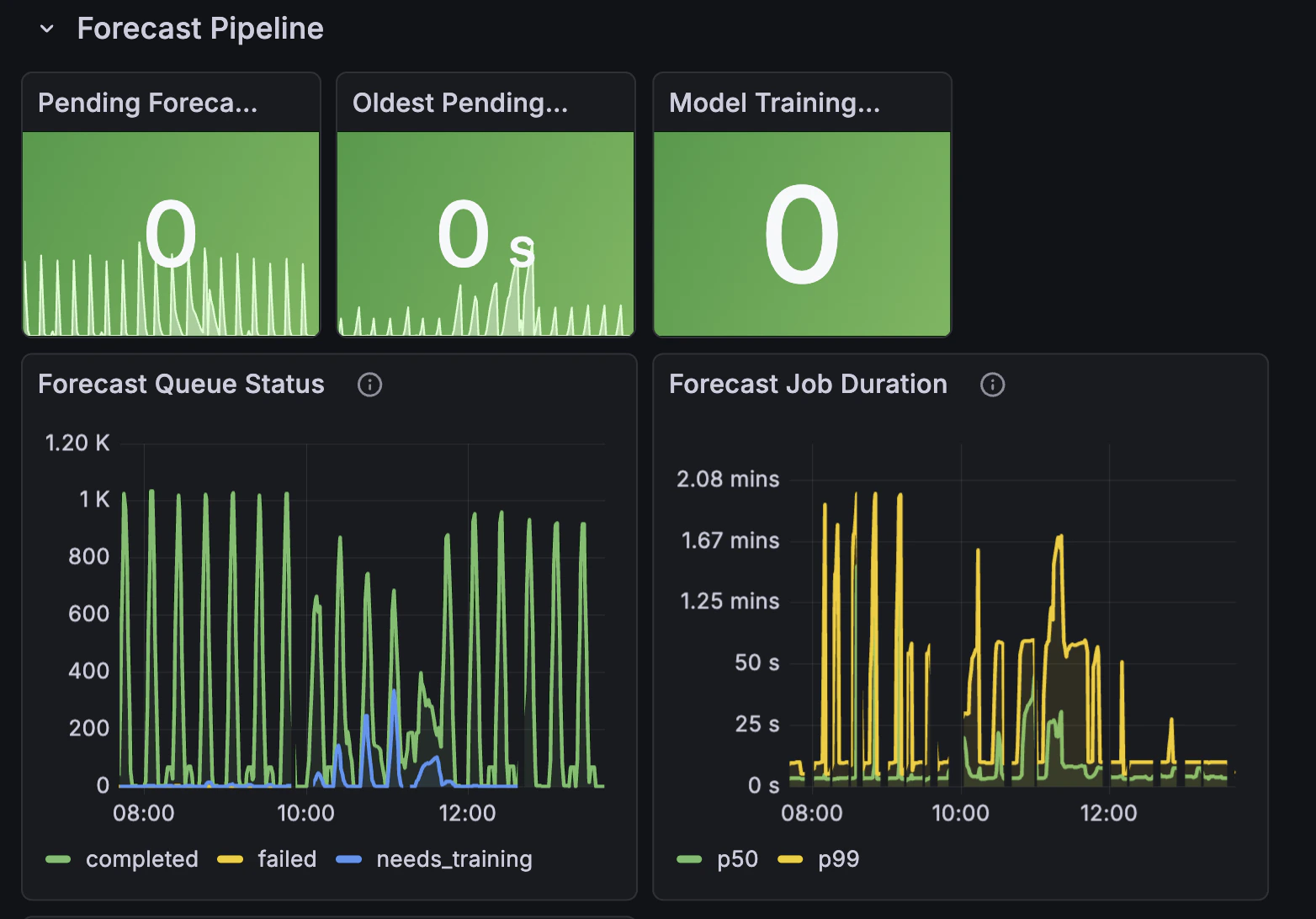
We provide a pre-built Grafana dashboard that visualizes Thoras metrics out of the box. It includes panels for scaling activity, provisioning efficiency, forecast pipeline health, API performance, and worker job status.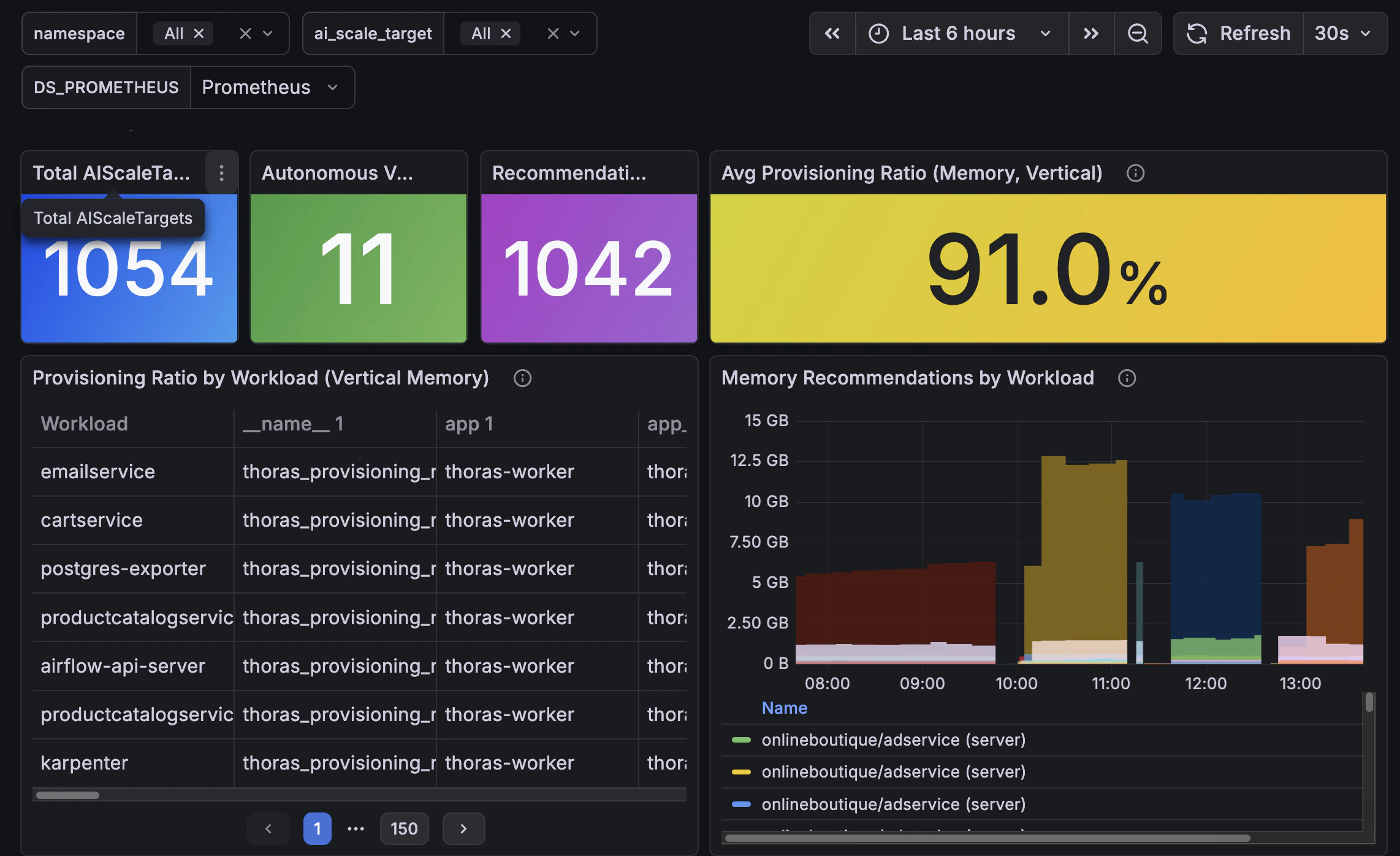
Importing the Dashboard
- Download the Thoras Grafana Dashboard
- In Grafana, go to Dashboards > New > Import
- Click Upload dashboard JSON file and select the downloaded file
- When prompted, select your Prometheus datasource that scrapes Thoras metrics
- Click Import
Prerequisites
- Thoras must be installed and exposing its Prometheus metrics endpoint
- A Prometheus instance must be scraping Thoras metrics
- Grafana must have that Prometheus instance configured as a datasource