> ## Documentation Index
> Fetch the complete documentation index at: https://docs.thoras.ai/llms.txt
> Use this file to discover all available pages before exploring further.
# Azure Entra Authentication with oauth2-proxy
> How to front the Thoras dashboard with oauth2-proxy so that users must authenticate against Azure Entra ID (formerly Azure AD) before reaching the dashboard.
This guide describes how to front the Thoras dashboard with
[oauth2-proxy](https://oauth2-proxy.github.io/oauth2-proxy/) so that users must
authenticate against Azure Entra ID (formerly Azure AD) before reaching the
dashboard.
## How it works
oauth2-proxy runs as a sidecar container next to the Thoras dashboard container.
Traffic hits oauth2-proxy first; it handles the OIDC login flow against Entra,
then reverse-proxies authenticated requests to the dashboard's local port.
```
User -> oauth2-proxy (:4180) -> Entra OIDC login -> Thoras Dashboard (:8080)
```
## Setup
### 1. Register an app in Azure Entra
1. In the Azure Portal, go to **Entra ID -> App registrations -> New
registration**.
2. Set a **Redirect URI** of type "Web":
`https://thoras.yourcompany.com/oauth2/callback`.
3. Note the **Application (client) ID** and **Directory (tenant) ID**. You'll
need both.
4. Under **Certificates & secrets**, create a new client secret and copy its
value immediately (it's only shown once).
5. Under **API permissions**, ensure `openid`, `email`, and `profile` delegated
permissions are present (these are granted by default for most app
registrations).
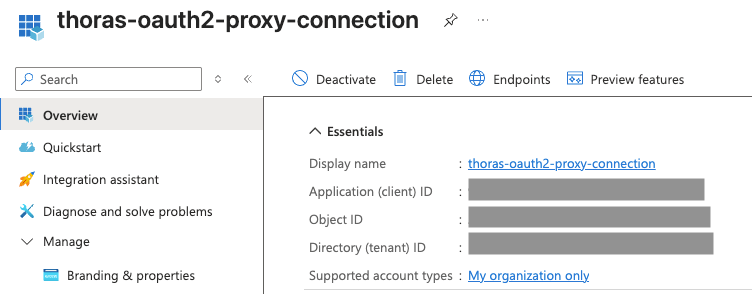 See oauth2-proxy's own walkthrough of this same registration process:
[Microsoft Entra ID provider config](https://oauth2-proxy.github.io/oauth2-proxy/configuration/providers/ms_entra_id).
### 2. Create the Kubernetes secret
oauth2-proxy needs three secrets, referenced via `secretKeyRef` rather than
inlined in `values.yaml`:
| Key | Purpose |
| --------------- | -------------------------------------------------------------- |
| `client-id` | The Entra application (client) ID |
| `client-secret` | The Entra client secret |
| `cookie-secret` | A random value oauth2-proxy uses to encrypt its session cookie |
Generate the cookie secret with:
```bash theme={null}
openssl rand -base64 32 | head -c 32 | base64
```
Create the secret (values below are base64-encoded automatically by `kubectl`
when using `--from-literal`):
```bash theme={null}
kubectl create secret generic oauth2-proxy-secrets \
--namespace thoras \
--from-literal=client-id="" \
--from-literal=client-secret="" \
--from-literal=cookie-secret="$(openssl rand -base64 32 | head -c 32 | base64)"
```
### 3. Configure the oauth2-proxy sidecar in `values.yaml`
Add an `extraContainers` entry under `thorasDashboard`:
```yaml theme={null}
thorasDashboard:
extraContainers:
- name: oauth2-proxy
image: quay.io/oauth2-proxy/oauth2-proxy:v7.15.2
args:
- --provider=oidc
- --oidc-issuer-url=https://login.microsoftonline.com//v2.0
- --http-address=0.0.0.0:4180
- --upstream=http://127.0.0.1:8080
- --email-domain=yourcompany.com
- --cookie-secure=true
- --redirect-url=https://thoras.yourcompany.com/oauth2/callback
- --skip-provider-button=true
- --insecure-oidc-allow-unverified-email=false
ports:
- name: proxy
containerPort: 4180
env:
- name: OAUTH2_PROXY_CLIENT_ID
valueFrom:
secretKeyRef:
name: oauth2-proxy-secrets
key: client-id
- name: OAUTH2_PROXY_CLIENT_SECRET
valueFrom:
secretKeyRef:
name: oauth2-proxy-secrets
key: client-secret
- name: OAUTH2_PROXY_COOKIE_SECRET
valueFrom:
secretKeyRef:
name: oauth2-proxy-secrets
key: cookie-secret
readinessProbe:
httpGet:
path: /ping
port: 4180
initialDelaySeconds: 5
periodSeconds: 10
resources:
requests:
cpu: 25m
memory: 32Mi
limits:
cpu: 100m
memory: 64Mi
```
#### Key flags explained
Full flag reference:
[oauth2-proxy configuration options](https://oauth2-proxy.github.io/oauth2-proxy/configuration/overview).
* `--oidc-issuer-url` — points to your Entra tenant's v2.0 OIDC endpoint.
Replace `` with your Directory (tenant) ID. See the
[Entra ID provider docs](https://oauth2-proxy.github.io/oauth2-proxy/configuration/providers/ms_entra_id)
for tenant-specific vs. multi-tenant issuer URL variants.
* `--upstream` — the dashboard's local container port that oauth2-proxy proxies
to after successful auth. This stays plain HTTP over loopback (`127.0.0.1`)
because it's a same-pod, container-to-container hop. TLS belongs on the
external-facing side (`--cookie-secure`, ingress TLS), not here. See
[upstream configuration](https://oauth2-proxy.github.io/oauth2-proxy/configuration/overview/#upstreams-configuration).
* `--email-domain=yourcompany.com` — restricts login to your org's email
domain(s). Replace with your actual domain, or pass the flag multiple times
for more than one domain.
* `--cookie-secure=true` — only send the session cookie over HTTPS. Requires the
dashboard to actually be served over HTTPS end-to-end (see the ingress note
below).
* `--redirect-url=https://thoras.yourcompany.com/oauth2/callback` — must be the
real external hostname of the dashboard, over HTTPS, and must exactly match a
redirect URI registered on the Entra app registration.
* `--skip-provider-button=true` — since there's only one provider (Entra), skip
the "choose a provider" landing page and redirect straight to login.
### 4. Deploy and verify
1. Apply the secret (step 2) and upgrade the Helm release with the updated
`values.yaml`.
2. Confirm the sidecar comes up healthy:
```bash theme={null}
kubectl -n thoras get pods -l app=thoras-dashboard
kubectl -n thoras logs -c oauth2-proxy
```
3. Visit the dashboard URL. You should be redirected to Microsoft's login page,
and land back on the dashboard after authenticating.
4. If the redirect fails or loops, double-check that `--redirect-url` exactly
matches a redirect URI registered on the Entra app, and that
`--oidc-issuer-url` matches your tenant.
## Exposing the sidecar with a Service and HTTPRoute
To reach oauth2-proxy from outside the cluster, point a `Service` at its port
(`4180`), not the dashboard's port (`8080`), so all external traffic is forced
through the auth check.
```yaml theme={null}
apiVersion: v1
kind: Service
metadata:
name: thoras-dashboard-oauth2-proxy
namespace: thoras
spec:
selector:
app: thoras-dashboard
ports:
- name: proxy
port: 80
targetPort: proxy
```
Then create an `HTTPRoute` (Gateway API) that routes the dashboard hostname to
that Service, attached to an existing `Gateway`:
```yaml theme={null}
apiVersion: gateway.networking.k8s.io/v1
kind: HTTPRoute
metadata:
name: thoras-dashboard
namespace: thoras
spec:
parentRefs:
- name: eg
sectionName: http
hostnames:
- thoras.yourcompany.com
rules:
- matches:
- path:
type: PathPrefix
value: /
backendRefs:
- group: ""
kind: Service
name: thoras-dashboard-oauth2-proxy
port: 80
weight: 1
```
Adjust `parentRefs` to match your cluster's actual `Gateway` name/namespace, and
terminate TLS on the `Gateway`'s listener (or upstream at a cert-manager-issued
`Certificate` bound to it) rather than on the `HTTPRoute`. Once DNS for
`thoras.yourcompany.com` resolves to the Gateway and a valid TLS cert is issued,
visiting the dashboard URL should trigger the Entra login flow described in step
3 above.
## Further reading
* [oauth2-proxy documentation home](https://oauth2-proxy.github.io/oauth2-proxy/)
* [Microsoft Entra ID provider configuration](https://oauth2-proxy.github.io/oauth2-proxy/configuration/providers/ms_entra_id)
* [Configuration overview / full flag reference](https://oauth2-proxy.github.io/oauth2-proxy/configuration/overview)
* [Session storage options](https://oauth2-proxy.github.io/oauth2-proxy/configuration/session_storage)
* [TLS configuration](https://oauth2-proxy.github.io/oauth2-proxy/configuration/tls)
See oauth2-proxy's own walkthrough of this same registration process:
[Microsoft Entra ID provider config](https://oauth2-proxy.github.io/oauth2-proxy/configuration/providers/ms_entra_id).
### 2. Create the Kubernetes secret
oauth2-proxy needs three secrets, referenced via `secretKeyRef` rather than
inlined in `values.yaml`:
| Key | Purpose |
| --------------- | -------------------------------------------------------------- |
| `client-id` | The Entra application (client) ID |
| `client-secret` | The Entra client secret |
| `cookie-secret` | A random value oauth2-proxy uses to encrypt its session cookie |
Generate the cookie secret with:
```bash theme={null}
openssl rand -base64 32 | head -c 32 | base64
```
Create the secret (values below are base64-encoded automatically by `kubectl`
when using `--from-literal`):
```bash theme={null}
kubectl create secret generic oauth2-proxy-secrets \
--namespace thoras \
--from-literal=client-id="" \
--from-literal=client-secret="" \
--from-literal=cookie-secret="$(openssl rand -base64 32 | head -c 32 | base64)"
```
### 3. Configure the oauth2-proxy sidecar in `values.yaml`
Add an `extraContainers` entry under `thorasDashboard`:
```yaml theme={null}
thorasDashboard:
extraContainers:
- name: oauth2-proxy
image: quay.io/oauth2-proxy/oauth2-proxy:v7.15.2
args:
- --provider=oidc
- --oidc-issuer-url=https://login.microsoftonline.com//v2.0
- --http-address=0.0.0.0:4180
- --upstream=http://127.0.0.1:8080
- --email-domain=yourcompany.com
- --cookie-secure=true
- --redirect-url=https://thoras.yourcompany.com/oauth2/callback
- --skip-provider-button=true
- --insecure-oidc-allow-unverified-email=false
ports:
- name: proxy
containerPort: 4180
env:
- name: OAUTH2_PROXY_CLIENT_ID
valueFrom:
secretKeyRef:
name: oauth2-proxy-secrets
key: client-id
- name: OAUTH2_PROXY_CLIENT_SECRET
valueFrom:
secretKeyRef:
name: oauth2-proxy-secrets
key: client-secret
- name: OAUTH2_PROXY_COOKIE_SECRET
valueFrom:
secretKeyRef:
name: oauth2-proxy-secrets
key: cookie-secret
readinessProbe:
httpGet:
path: /ping
port: 4180
initialDelaySeconds: 5
periodSeconds: 10
resources:
requests:
cpu: 25m
memory: 32Mi
limits:
cpu: 100m
memory: 64Mi
```
#### Key flags explained
Full flag reference:
[oauth2-proxy configuration options](https://oauth2-proxy.github.io/oauth2-proxy/configuration/overview).
* `--oidc-issuer-url` — points to your Entra tenant's v2.0 OIDC endpoint.
Replace `` with your Directory (tenant) ID. See the
[Entra ID provider docs](https://oauth2-proxy.github.io/oauth2-proxy/configuration/providers/ms_entra_id)
for tenant-specific vs. multi-tenant issuer URL variants.
* `--upstream` — the dashboard's local container port that oauth2-proxy proxies
to after successful auth. This stays plain HTTP over loopback (`127.0.0.1`)
because it's a same-pod, container-to-container hop. TLS belongs on the
external-facing side (`--cookie-secure`, ingress TLS), not here. See
[upstream configuration](https://oauth2-proxy.github.io/oauth2-proxy/configuration/overview/#upstreams-configuration).
* `--email-domain=yourcompany.com` — restricts login to your org's email
domain(s). Replace with your actual domain, or pass the flag multiple times
for more than one domain.
* `--cookie-secure=true` — only send the session cookie over HTTPS. Requires the
dashboard to actually be served over HTTPS end-to-end (see the ingress note
below).
* `--redirect-url=https://thoras.yourcompany.com/oauth2/callback` — must be the
real external hostname of the dashboard, over HTTPS, and must exactly match a
redirect URI registered on the Entra app registration.
* `--skip-provider-button=true` — since there's only one provider (Entra), skip
the "choose a provider" landing page and redirect straight to login.
### 4. Deploy and verify
1. Apply the secret (step 2) and upgrade the Helm release with the updated
`values.yaml`.
2. Confirm the sidecar comes up healthy:
```bash theme={null}
kubectl -n thoras get pods -l app=thoras-dashboard
kubectl -n thoras logs -c oauth2-proxy
```
3. Visit the dashboard URL. You should be redirected to Microsoft's login page,
and land back on the dashboard after authenticating.
4. If the redirect fails or loops, double-check that `--redirect-url` exactly
matches a redirect URI registered on the Entra app, and that
`--oidc-issuer-url` matches your tenant.
## Exposing the sidecar with a Service and HTTPRoute
To reach oauth2-proxy from outside the cluster, point a `Service` at its port
(`4180`), not the dashboard's port (`8080`), so all external traffic is forced
through the auth check.
```yaml theme={null}
apiVersion: v1
kind: Service
metadata:
name: thoras-dashboard-oauth2-proxy
namespace: thoras
spec:
selector:
app: thoras-dashboard
ports:
- name: proxy
port: 80
targetPort: proxy
```
Then create an `HTTPRoute` (Gateway API) that routes the dashboard hostname to
that Service, attached to an existing `Gateway`:
```yaml theme={null}
apiVersion: gateway.networking.k8s.io/v1
kind: HTTPRoute
metadata:
name: thoras-dashboard
namespace: thoras
spec:
parentRefs:
- name: eg
sectionName: http
hostnames:
- thoras.yourcompany.com
rules:
- matches:
- path:
type: PathPrefix
value: /
backendRefs:
- group: ""
kind: Service
name: thoras-dashboard-oauth2-proxy
port: 80
weight: 1
```
Adjust `parentRefs` to match your cluster's actual `Gateway` name/namespace, and
terminate TLS on the `Gateway`'s listener (or upstream at a cert-manager-issued
`Certificate` bound to it) rather than on the `HTTPRoute`. Once DNS for
`thoras.yourcompany.com` resolves to the Gateway and a valid TLS cert is issued,
visiting the dashboard URL should trigger the Entra login flow described in step
3 above.
## Further reading
* [oauth2-proxy documentation home](https://oauth2-proxy.github.io/oauth2-proxy/)
* [Microsoft Entra ID provider configuration](https://oauth2-proxy.github.io/oauth2-proxy/configuration/providers/ms_entra_id)
* [Configuration overview / full flag reference](https://oauth2-proxy.github.io/oauth2-proxy/configuration/overview)
* [Session storage options](https://oauth2-proxy.github.io/oauth2-proxy/configuration/session_storage)
* [TLS configuration](https://oauth2-proxy.github.io/oauth2-proxy/configuration/tls)